Kill the Fill vs CapCut
Short answer: CapCut is a genuinely capable free-to-start editor for social video — but its Remove Silence and filler-word tools sit behind Pro ($19.99/mo as of July 2026) and run in the cloud. Kill the Fill does that one job — cutting um, uh, eee, ııı and dead air — 100% on your Mac, for $29 once.
Free trial: 3 exports, unlimited previews — no account, no card
🔒 100% on-device — your footage never leaves your Mac · Works offline · Apple Silicon native
Same feature name, different product
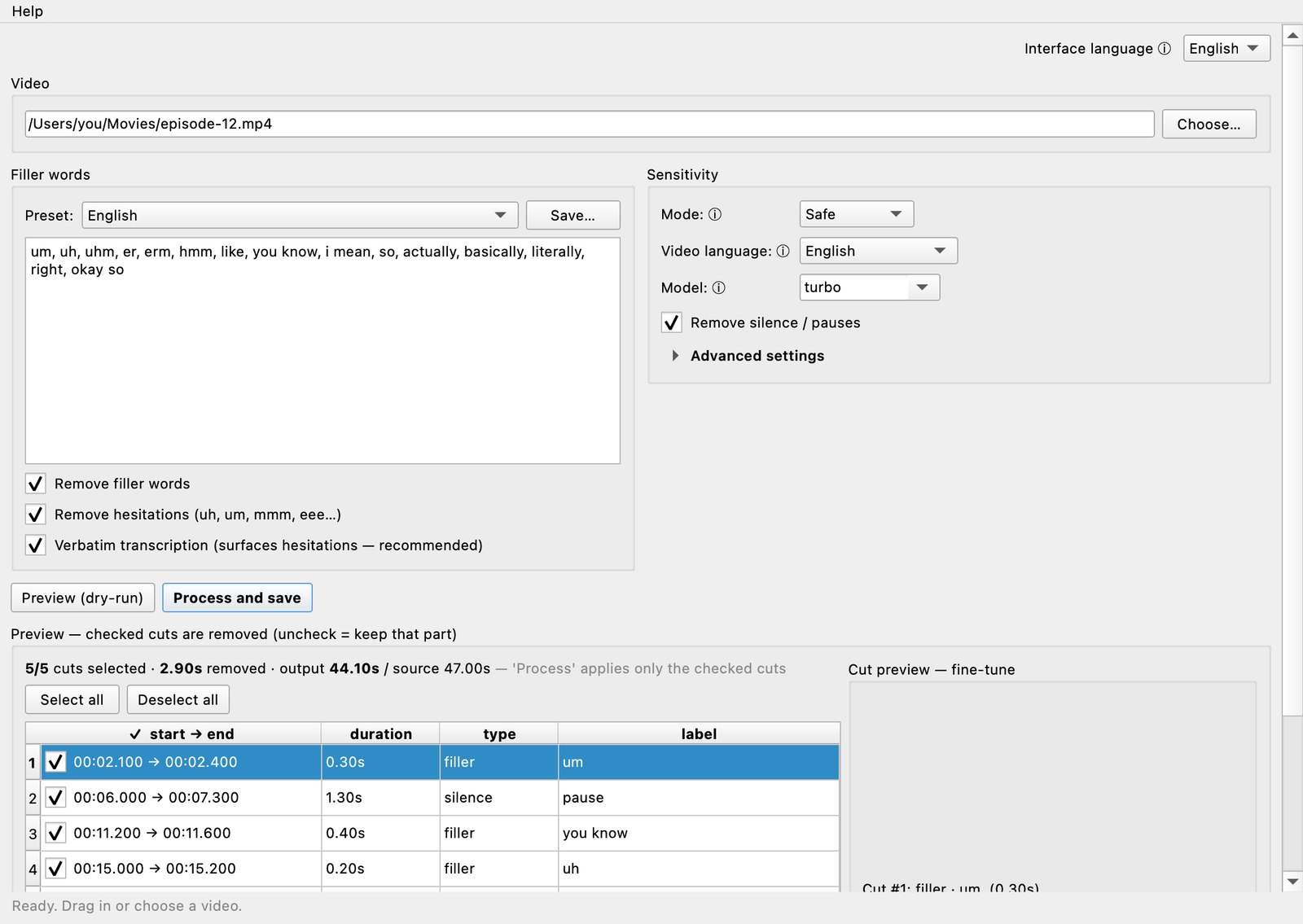
If you searched "CapCut remove silence", you probably don't need another full editor — you need the pauses and filler words gone. That's the whole difference here. CapCut is an all-in-one social-video suite where auto-cutting is one AI tool among dozens, gated by a subscription and processed on remote servers. Kill the Fill is a single-purpose Mac utility built on on-device Whisper speech recognition: drop in a talking-head video, review every proposed cut, render — nothing uploaded, nothing to subscribe to. Neither is "better"; they're built for different jobs. The table below shows exactly where each one wins.
Silence & filler removal, compared
| CapCut | Kill the Fill | |
|---|---|---|
| Price for auto-cutting | Pro: $19.99/mo (~$179.99/yr) as of July 2026 — check capcut.com, pricing varies by region. Silence removal and filler-word removal are not on the free tier, and AI tools also draw from a monthly AI-credit allowance. Mobile in-app pricing runs higher (~$22/mo). | $29 one-time. No subscription, no credits. Free trial: unlimited previews + 3 exports. |
| Where processing happens | Cloud — the AI tools (silence, fillers, captions) are cloud-processed and need an internet connection, so processing time also depends on your upload speed. | 100% on-device — on-device Whisper speech recognition. Your video never leaves the Mac. Works fully offline, offline license activation too. |
| Silence removal | Yes — "Remove Silence" + AutoCut (Pro). Built for clean single-speaker audio; like most auto-cutters, results vary with music or background noise. | Yes — including a silence-only turbo mode that skips transcription entirely, so long videos analyse very fast. Adjustable sensitivity and padding. |
| Filler-word removal | Yes, transcript-based (Pro) — generate auto captions with "identify filler words" on, then delete highlighted fillers from the transcript. Advertised vocabulary is English-centric. | Yes, purpose-built — detects um, uh, hesitations and Turkish fillers like eee / ııı directly, with adjustable sensitivity. |
| Turkish fillers | Turkish auto-captions are supported, but there's no documented Turkish-specific filler detection (şey, yani, ee). | Built for it. Turkish fillers are a core use case; the app's UI ships in English and Turkish. |
| Control over cuts | Review cuts on the timeline after applying; delete fillers individually or in bulk from the transcript. | Full manual override: preview every proposed cut, toggle it on/off, fine-tune its boundaries — nothing is cut without your say. |
| Hand-off to a pro editor | Unreliable — projects live in CapCut's own format. Third-party blogs claim a desktop XML export exists, but we found no official documentation; treat it as unverified. | Yes — export the cut plan as FCPXML (Final Cut Pro / DaVinci Resolve), Premiere Pro XML or EDL CMX3600. Every cut arrives as separate clips; you keep final say. |
| Captions | Excellent — fast, styled, animated caption templates built for TikTok/Reels/Shorts, broad language coverage, SRT export. One of CapCut's strongest features. | SRT / VTT captions, retimed to the edited video — fillers gone from the subtitles too. No styling templates; it's a hand-off file, not a caption designer. |
| Full video editor | Yes — multi-track timeline, effects, templates, TTS, background removal, direct TikTok publishing. The free tier alone is a real editor (1080p, no watermark on plain exports). | No — deliberately. It removes fillers and silences, renders a clean video (or a timeline for your NLE), and gets out of the way. |
| Platforms | Everywhere — Windows, macOS, iOS, Android, web, with cloud sync across devices. | macOS only, Apple Silicon native. No Windows or mobile version. |
| Privacy & footage rights | CapCut's 2025 Terms of Service update was widely reported to grant a broad, perpetual license to uploaded content — including face and voice data — and a US privacy lawsuit was allowed to proceed in 2025. Read the current ToS yourself before uploading sensitive footage. | Nothing to license. No account, no upload — your footage is never in anyone else's possession. |
CapCut details based on public pricing pages, official docs and third-party reporting as of July 2026 — plans and features change, so double-check capcut.com before buying. We've flagged anything we couldn't verify officially.
Which one is for you?
Choose CapCut if…
- You want one app to edit, caption, add effects and publish straight to TikTok/Reels/Shorts.
- Styled, animated captions matter more to you than the cutting itself — CapCut's are best-in-class for short-form.
- You work across Windows, mobile and web, not just a Mac.
- A free tier for general editing is the priority, and you're fine paying about $20/month when you need the AI tools.
- Cloud processing of your footage isn't a concern for the content you make.
Choose Kill the Fill if…
- Cutting silences and filler words is the actual job — you don't need another editor.
- Your footage can't go to a third-party cloud: client work, internal, legal, medical, unreleased content.
- You speak Turkish (or edit Turkish speakers) and need eee/ııı caught, not just "um".
- You finish in Final Cut, Premiere or Resolve and want the cuts delivered as an editable timeline, not baked in.
- You'd rather pay $29 once than about $20 every month for one feature.
What people actually ask
Does CapCut remove silence for free?
No — Remove Silence and AutoCut are part of the Pro AI toolkit ($19.99/mo or ~$179.99/yr as of July 2026; check capcut.com), and AI features also consume a monthly credit allowance. The free tier is a solid basic editor, but the auto-cut tools aren't in it. Kill the Fill's trial is free with unlimited previews and 3 full exports, no account or card.
Does CapCut remove filler words automatically?
Yes, on Pro — but it's transcript-driven: you generate auto captions with filler detection on, then delete the highlighted words, which cuts the video. It works, and the advertised vocabulary is English-centric ("um", "uh", "like", "you know"). Kill the Fill detects fillers directly — including Turkish eee/ııı — and every proposed cut can be previewed and tuned before rendering.
Does CapCut upload my video to the cloud?
For the AI features, yes — silence removal, filler detection and auto captions are cloud-processed, under terms that have been widely reported to grant a broad, perpetual license to uploaded content. Kill the Fill runs entirely on your Mac: no upload, no account, works offline.
Can I use Kill the Fill and CapCut together?
Yes — and it's a genuinely good combo. Clean your talking-head footage in Kill the Fill first (fillers and dead air gone, 100% locally), then bring the rendered video into CapCut for styled captions, effects and publishing. You get CapCut's strengths without sending your raw, unedited footage to the cloud.
See your fillers before you pay a cent
Drop in a video, preview every cut it finds — free, on your Mac, no account.
Unlimited previews + 3 exports free · License key shown instantly at checkout & e-mailed · macOS, Apple Silicon